
Guide – 6 min read
Giveaways are the fastest way to make a Discord server feel alive. You do not need a paid bot, and you do not need to code. In this guide you will run a giveaway with your own bot: members press a button to enter, and the bot picks a winner by itself.
No code Free Windows About 10 minutes
Why run giveaways with your own bot?
Most giveaway bots are shared by thousands of servers. When you make your own, it only does what you want, it carries your name and picture, and nobody can take features away behind a paywall. With a no-code Discord bot maker like Cubevate, you build it from blocks instead of writing code.
You have two ways to do it. The template way is the best place to start: it uses a ready-made template and takes about two minutes. The Dashboard way is the fastest once your bot is on a host and connected. It gives you a control panel where you can see people join live, change the message and look back at past giveaways.
Before you start
You need a bot that is made and invited to your server. If you have not done that yet, follow How to make a Discord bot without coding first. It takes about 10 minutes, and you only do it once.
Start here: the giveaway template
- Open Cubevate and press Templates in the top bar.
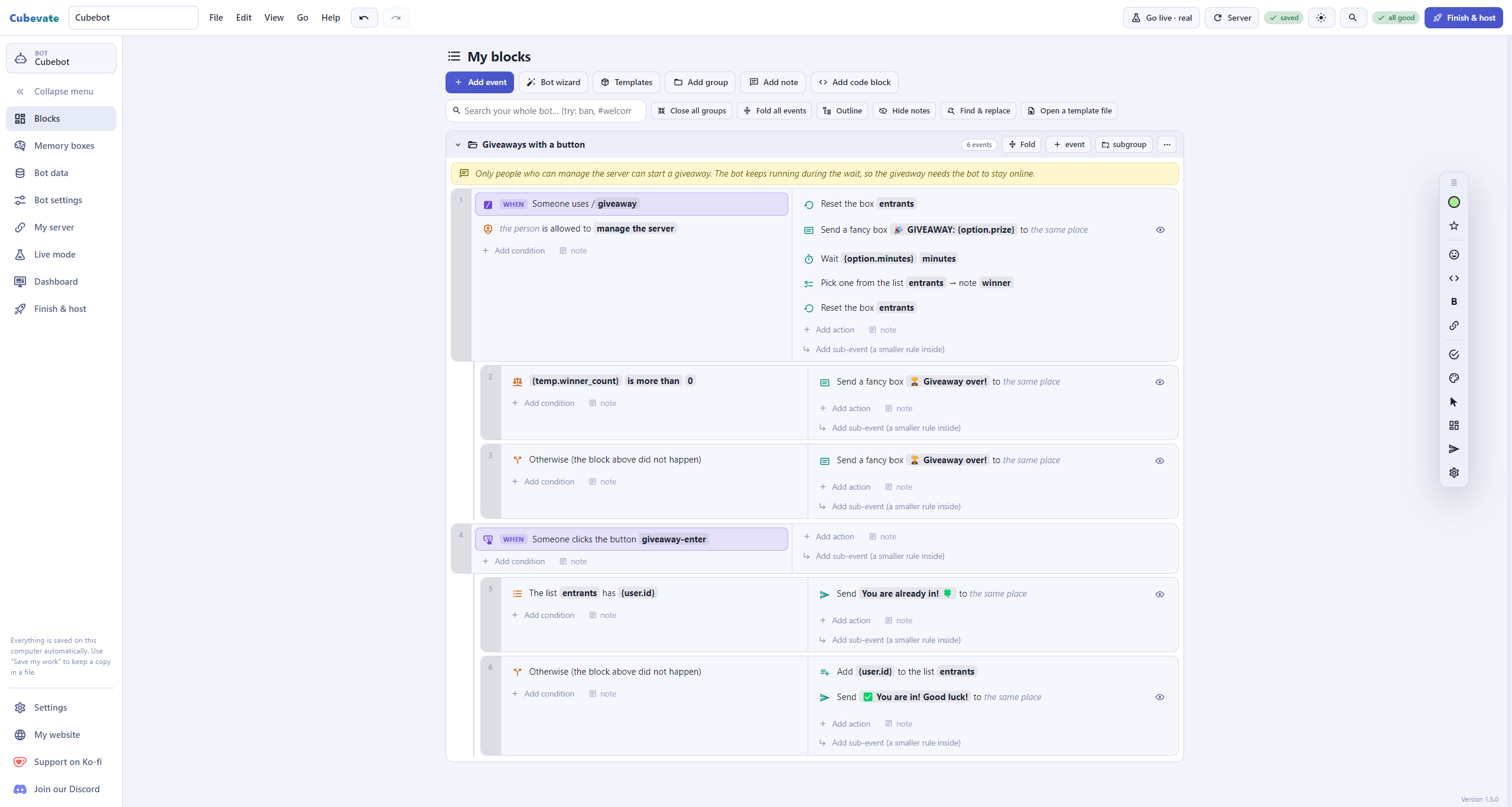
- Pick Giveaways with a button (in the Community group) and press Add to my bot. It also adds the memory box that remembers who entered.
- Press Finish & host and start your bot (the guide above shows how).
- In your server type /giveaway, fill in the prize and how many minutes it should run. The bot posts a message with an Enter button.
When the time is up, the bot picks one entrant at random and announces the winner. Only people who can manage the server can start a giveaway, and each person can enter once.
Good to know: this version waits inside your bot, so the bot has to stay online until the giveaway ends. If your bot restarts in the middle, that giveaway stops. For long giveaways (days) use the Dashboard way below.
The fastest way once you are set up: the Dashboard
If your bot runs 24/7 on a host, Cubevate’s Dashboard has a full Giveaways tab. It needs the newest bot (download your bot again and replace bot.js). The Run and host guide explains how to connect the Dashboard.
- Open the Dashboard page in Cubevate and choose Giveaways.
- Press Start a giveaway. Pick the channel, type the prize, choose how many winners and when it ends (there are quick buttons for 1 hour, 1 day, 3 days and 7 days).
- Write your own title and text, pick a colour and add a picture if you like. A preview on the right shows how the message will look in Discord.
- Press Start the giveaway. The bot posts it with an Enter button.
While it runs, a Live now card shows how many people joined, a countdown, and the winners. You can open the list of joiners, edit the message, end it early, cancel it or open it in Discord.
After the giveaway
Finished giveaways move to the Past giveaways grid. From there you can:
- Re-roll to pick one more winner if the first one does not answer.
- Duplicate to start a new giveaway with the same words and settings.
- Keep the ones you want to remember (kept giveaways are never cleaned away).
- Delete the ones you do not need, with the choice to remove the Discord message too.
The bot checks that winners are still in your server before it announces them, so a person who left cannot win.
Tips for a good giveaway
- Say clearly what the prize is and when it ends.
- Pick a quiet time to end it, so people can see the winner announcement.
- Keep the rules short. One entry per person is already built in.
- Start with a small prize to test the whole thing on a test server first.
Video: host your bot 24/7 and set up the Dashboard
Watch the full walkthrough: how to host your Discord bot 24/7 on a bot host and set up the Dashboard, step by step.
Ready to run your first giveaway?
Download Cubevate for free and start your first giveaway today. If you get stuck, the Cubevate docs have a step-by-step guide for everything, and you can ask questions in the Cubefem Discord community.